Setting the right rental price can feel like a guessing game. Price it too low and you lose income; set it too high and your property may sit vacant. That’s where rent calculators come in. Tools like Rentometer help landlords, investors, and property managers quickly compare local rental rates and determine a price that’s both competitive and profitable. In this post, we’ll break down what Rentometer is, how it works, its key features, pros and cons, pricing, accuracy, and frequently asked questions.
What is Rentometer?
Rentometer is an online rent calculator that helps landlords and property managers, and real estate investors determine the right rental price for a property. By analyzing a large database of rental listings, Rentometer provides quick rent estimates and side-by-side comparisons of similar properties in a chosen location. This makes it easier to understand local rental market trends, set competitive prices, and avoid vacancies or lost income.
Rentometer Features
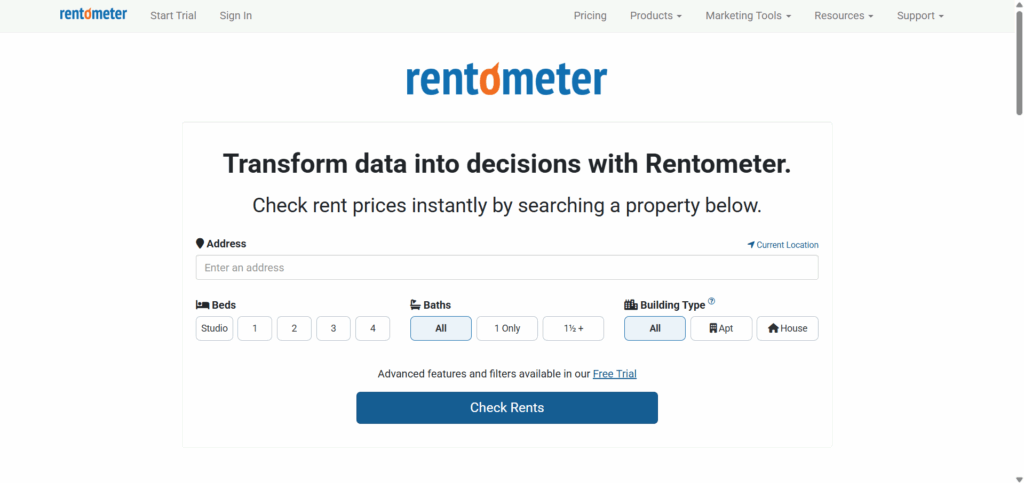
- Multiple search options: One of Rentometer’s best capabilities is the flexibility in how you start a search. You can enter an address, neighborhood, ZIP code, or city and instantly see rent comps tailored to that location.
- Customizable filters: Instead of a one-size-fits-all approach, Rentometer lets you refine results by bedrooms, bathrooms, building type, square footage, radius, price range, and even how far back in time you want the data to go (like the past 12 months).
- Large database: Rentometer pulls from thousands of rental comps in its system, giving you a broader view than what you’d get by scrolling through a few random listings.
- QuickView rent estimate: With a few clicks, you get an average rent, median rent, and even the 25th and 75th percentile ranges.
- Report options: If you need more than a quick snapshot, you can subscribe to the product and generate Pro Reports, and brand them with your own logo.
- Mobile App: Rentometer offers paid subscribers a mobile app available on both iOS and Android.
- API Access: Rentometer provides API access in its Pro and Enterprise plans, and the API usage is credit-based and varies by subscription tier.
Pros vs Cons of Rentometer
Benefits
- Speed: Rentometer rapidly processes data, offering the data in a fraction of the time it would take manually.
- Ease of use: The platform is straightforward, requiring minimal learning curve for first-time users.
- Large database: Access to millions of listings ensures comprehensive coverage.
- Established reputation: Rentometer is a familiar name in the rental data space and has built visibility among landlords, investors, and property managers.
Limitations
- Limited advanced analytics: While great for quick assessments, Rentometer may fall short of the intricate analysis offered by more advanced tools.
- Ballpark: Offers only a ballpark rent figure, not exact pricing. So, if Rentometer suggests $2,300 but the market supports $2,450, that’s a 6% underpricing and a $1,800 annual loss.
- Only for landlords: Because results are only ballpark figures, the tool is more suited to casual landlords. Small and mid-sized property managers, who depend on accuracy to maximize returns across portfolios, may find it inadequate.
How Much is Rentometer?
Rentometer updated its pricing from 2025 to 2026, moving away from an annual-first structure to a primarily monthly subscription model with lower entry pricing and a 3-day trial instead of a standard free trial.
- 3-Days Trial Access: Rentometer offers a 3-day trial, allowing users to test core features before committing to a paid subscription.
- Essential Plan – $16/month (billed monthly): Best for individual landlords needing quick pricing checks. Includes QuickView™ Rent Estimates, 10 Pro Reports and 10 Rent Comp downloads per month, plus custom branding and mobile app access..
- Pro Plan – $29/month (billed monthly): Best for active real estate professionals who need more volume and integrations. Includes QuickView™ Rent Estimates, 50 Pro Reports and 50 Rent Comp downloads per month, plus custom branding, mobile app access, Yield Tracker, API access, Batch Processor, and Lead Generation tools.
- Pro for Teams – Starting at $49/month: Best for teams needing shared access and reporting. Includes all Pro features with shared monthly limits — 50 reports/downloads (up to 5 users), 100 (up to 10 users), or 200 (up to 20 users), with custom pricing for larger teams.
Alternatives to Rentometer
If you’re looking for alternatives to Rentometer, the main options property managers and landlords often compare are CompIQ by Dwellsy, RentCast, and the Zillow Rent Calculator. Each offers a different approach: CompIQ emphasizes transparent, verified data and accuracy, RentCast provides API support and scalability, and Zillow focuses on renter-facing comparisons with broad coverage.
1. CompIQ by Dwellsy
CompIQ by Dwellsy is a strong alternative to Rentometer for property managers who need accuracy they can trust. All comps come directly from verified property management systems through Dwellsy’s rental platform, ensuring transparent data sourcing. With professional-grade reporting and an intuitive interface, CompIQ makes it easy to back up pricing decisions with reliable numbers.
Best for: Small to mid-sized property managers who prioritize pricing accuracy and transparency.
2. RentCast
RentCast serves as an alternative to Rentometer for larger operators who want API support and scalability. Its strength lies in nationwide coverage and the ability to integrate rent estimates into dashboards and workflows. While less transparent in how its data is sourced, RentCast appeals to property managers who need to handle larger portfolios with automated solutions.
Best for: Large property managers and investors who need integrations and scale.
3. Zillow Rent Calculator
Zillow’s rent calculator is another alternative to Rentometer, but it’s designed with renters in mind. It delivers quick estimates and side-by-side comparisons of up to five properties, complete with photos. While limited for professional use, it offers landlords a window into how renters perceive pricing and provides a free, familiar brand experience.
Best for: Renters who want a simple, branded comparison tool to understand what they should expect to pay.
Conclusion
Rentometer stands as a solid, user-friendly choice for landlords and very small property managers needing quick, reliable rent estimates. Its easy-to-navigate interface, coupled with a large database, positions it as an efficient tool for market overviews. However, for deep-diving analytics and accuracy, Rentometer may not be the best option.
FAQ
How accurate is Rentometer?
Rentometer offers only a ballpark rent estimate, not precise market data. Another point is that because it isn’t transparent about where its data comes from, accuracy can be limited, especially for property managers who need reliable, verifiable numbers. For those cases, tools like CompIQ provide stronger precision.
How much does Rentometer cost?
Rentometer’s pricing starts at $16 per month for the Essential plan and $29 per month for the Pro plan, with team plans beginning at $49 per month depending on the number of users. In 2026, the company moved from an annual-first structure to primarily monthly subscriptions and now offers a 3-day trial instead of a standard free trial.
Does Rentometer cover rental markets outside the United States?
Rentometer primarily operates within the U.S., focusing on American rental markets.
Does Rentometer have a mobile app?
Yes. Paid subscribers can access rent estimates through Rentometer’s mobile app, available on iOS and Android.
Does Rentometer offer API access?
Yes. Rentometer provides API access under its Pro and Team plans, allowing rent estimates to be integrated into external systems and workflows.
Is Rentometer suitable for large property management teams?
Rentometer offers team plans with shared monthly report limits, making it usable for small to mid-sized teams. Larger operators requiring extensive data depth or custom integrations may evaluate enterprise-grade alternatives, such as Dwellsy IQ.